Technical Overview · For Coaches & Experts

The coaching engine, explained.

A detailed look at how BetterRunning reads your biology, builds a periodized plan, and adapts every single morning — without a human coach in the loop.

Three signals · one score · today's session
BASELINEReadiness scored against your 7-day rolling baseline
PERIODIZATIONFull Base → Build → Peak → Taper periodization
CALIBRATIONPace zones calibrated from actual run data
PATTERNSMulti-day fatigue patterns detected automatically
Why current apps fall short

A plan built last week doesn't know about last night.

Most running apps hand you a template and a schedule. They don't know how you slept. They don't know your HRV dropped. They don't know you've been running faster than prescribed for three weeks. BetterRunning does.

The template problem

Generic plans ignore your history

A "Beginner Half Marathon" plan is the same for a runner averaging 35km/week as it is for someone coming back from injury. BetterRunning reads your last 10 runs, your current weekly volume, and your longest recent effort before writing a single session.

The static schedule problem

Fixed schedules can't adapt to recovery

You wake up on Thursday with a tempo session on the plan, a HRV reading 18% below your baseline, and 5.5 hours of sleep. A fixed plan sends you out hard anyway. BetterRunning recognizes the combination and adjusts before you lace up.

The calibration problem

Formula-based zones don't reflect you

Age-predicted max HR formulas carry known error ranges. Zone 2 prescriptions derived from a formula on day one don't account for how your actual physiology performs. BetterRunning learns your real-world pace at each intensity from your own workout data.

The feedback problem

No loop between results and future training

When you run 5:12/km on a Zone 2 day that was prescribed at 5:45/km, most apps don't notice. BetterRunning records the gap, recalibrates your zone paces, and factors it into the coaching note on your next session.

Module 1

The Readiness Engine

A composite daily score — built from three biometric signals, normalized against your own history.

How it works

Your baseline. Not a population average.

Every morning, BetterRunning fetches three signals from Apple Health: your HRV, your sleep (total hours plus deep and REM proportions), and your training load — measured as how your recent workload compares to what your body is used to (an acute-vs-chronic ratio), with a freshness signal layered on top.

The critical design choice: HRV is normalized against your own 7-day rolling baseline, not a generic table. A reading of 52ms means something very different for a runner whose baseline sits at 48ms versus one whose baseline is 70ms. The algorithm knows the difference.

Every runner, Premium or not, gets one readiness score saved per day whenever the app reads real Health data. Until 14 of the last 30 days have one, the default thresholds apply: "Optimal" from 70, "Ready" from 50, "Reduced" from 35 and "Recovery day" below that. Then they personalize to your own readiness-score history (its mean and spread) — so your score reflects where you stand relative to yourself, not a reference population. Today and Progress use the same thresholds, so one score always carries one name.
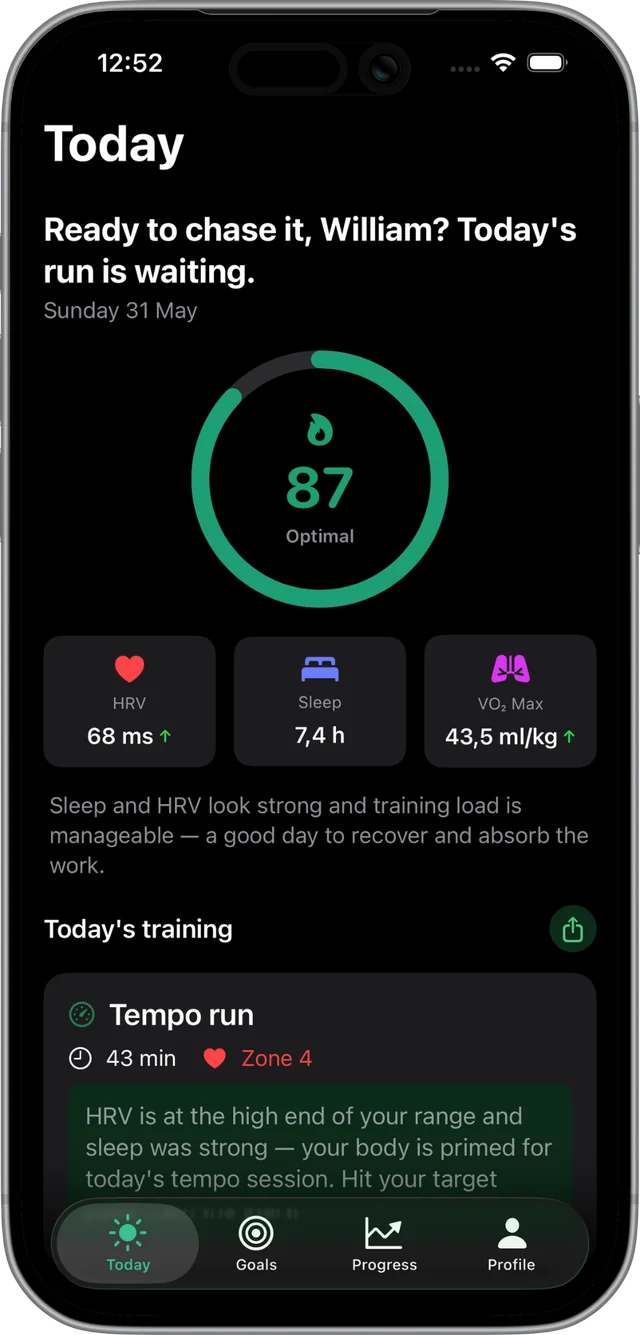
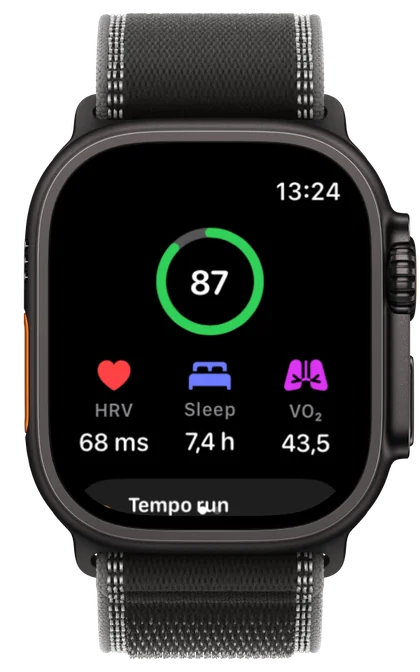
BetterRunning readiness score — Optimal, 87
Score composition
Weights
HRV
50%
Sleep quality
30%
Training load
20%
readiness = hrv × 50% + sleep × 30% + load × 20%
  • HRV scored via a log-domain z-score against your rolling 7-day mean and standard deviation, so a dip below baseline counts more than an equivalent rise
  • Only Apple Watch HRV is scored, because other devices' HRV isn't comparable. With none in the last week (a Garmin, a ring, or an Apple Watch rarely worn overnight), resting heart rate against its 14-day baseline stands in
  • Sleep score weights both duration and composition (deep + REM proportions)
  • Training load uses a freshness score derived from your acute vs. chronic training load — the same underlying data that also powers the separate ACWR injury-risk signal elsewhere in coaching — not raw calorie burn
  • Thresholds self-calibrate once there are 14 daily scores from the last 30 days — your "optimal" is yours alone. What is a good readiness score?
Module 2

Plan Architecture

Generated from your actual run history — not a questionnaire. Full periodization, proper volume progression, personalized HR zones.

How plans are built

The AI reads your history before it writes.

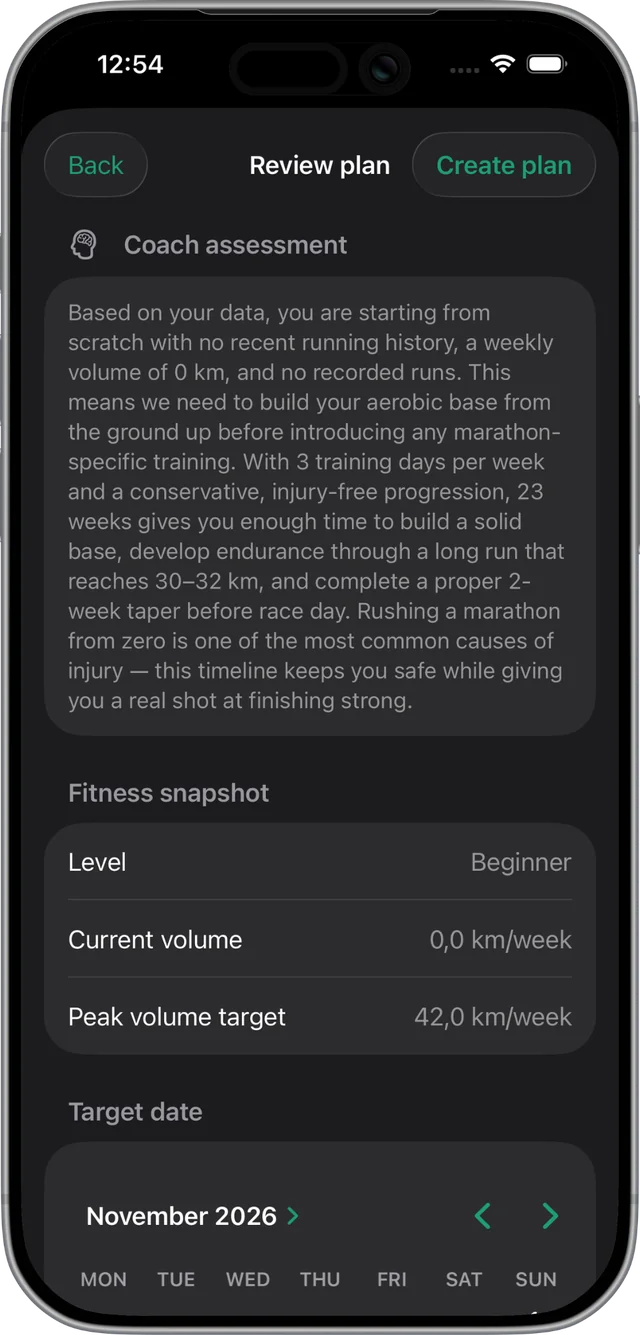
When you describe a goal, BetterRunning doesn't ask you to rate your fitness on a slider. It reads your last 10 runs from Apple Health — date, distance, duration, average pace, and average heart rate — alongside your normal weekly volume (the median of your last four weeks) and longest recent effort. The AI uses this actual data to assess whether your goal is feasible in your proposed timeframe before a plan is written.

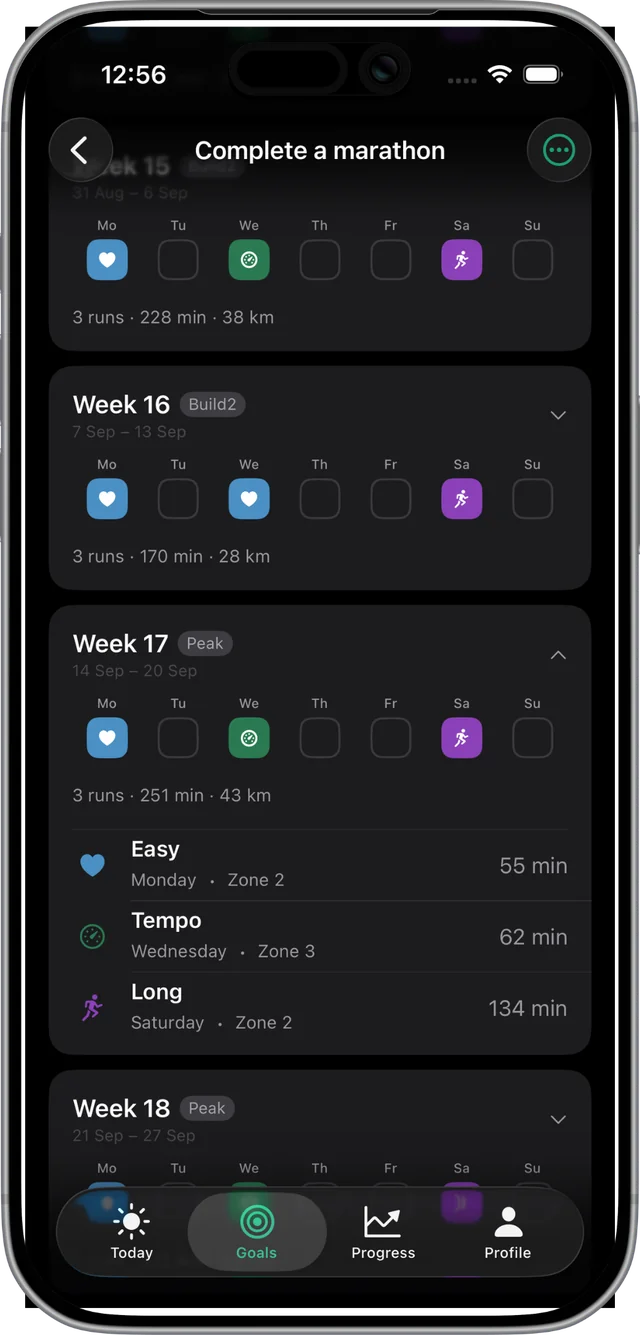
Plans follow classical periodization with phase durations scaled to total plan length. Volume progresses conservatively; hard sessions are never scheduled on consecutive days; the user's weekly schedule preferences are treated as hard constraints, not suggestions.

BetterRunning coach assessment and plan creation screen BetterRunning week-by-week marathon training plan
PHASE 1BaseAerobic foundation, Zone 2 emphasis
PHASE 2BuildTempo + intervals introduced, volume peaks
PHASE 3PeakRace-specific intensity, highest load
PHASE 4TaperVolume reduction, sharpening
  • Feasibility assessed before plan generation — a new goal needs at least six weeks, so the date picker stops at 42 days from today
  • Heart rate zones use the Karvonen (heart rate reserve) formula, from the highest heart rate in Apple Health over six months and your most recent resting heart rate — work out your own zones, or see what each run type is for
  • Volume progresses no faster than established sports science guidelines permit
  • Recovery weeks built in automatically at appropriate intervals
  • Each session includes zone, target pace, duration, and a coaching instruction
  • Interval sessions include the full rep structure (e.g., 6×800m @ Zone 5 with 90s recovery)
Module 3

Daily Adaptation

Every morning, the coaching engine sees your readiness, your recent pattern, and your training history — then decides if today's plan still makes sense.

Context-aware adjustment

One day's HRV isn't enough. The pattern is.

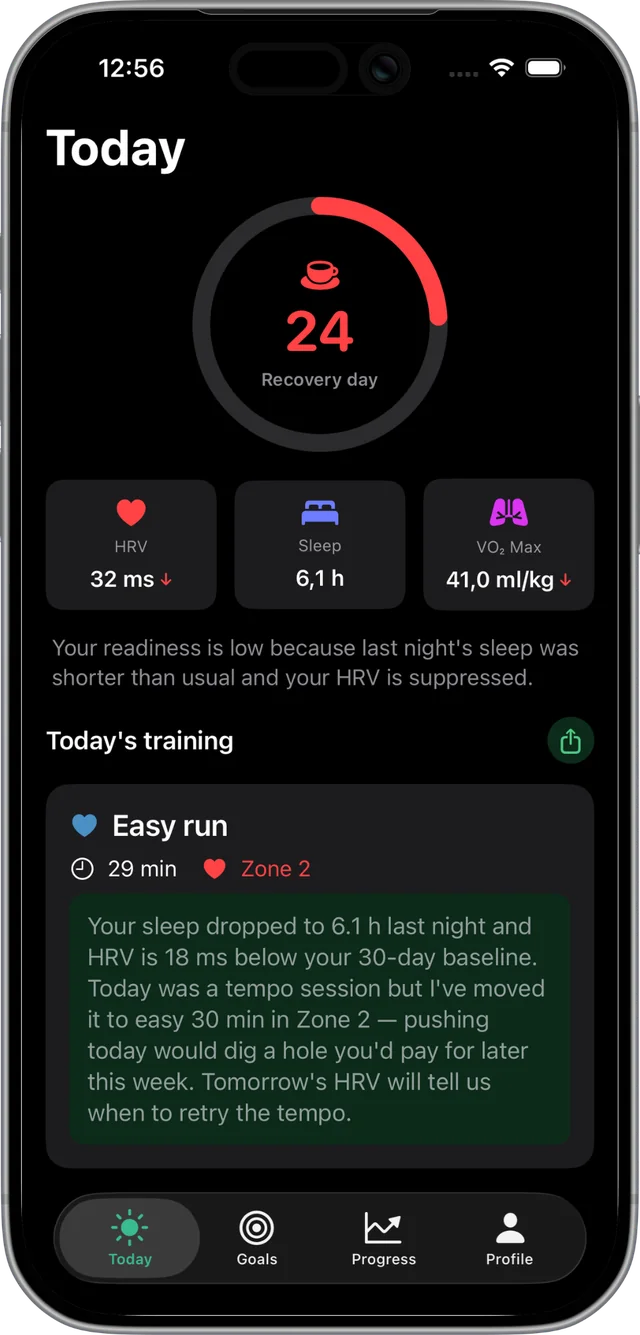
The daily coaching engine receives more than today's readiness score. It sees the last five days of coaching history — what was prescribed, what was modified, what was said — and the last five completed sessions with actual versus planned data. This context window is what separates a single data point from a pattern.

Session modifications are proportional and logical. A slightly reduced readiness on an interval day trims volume and considers dropping a zone. A multi-day pattern of low scores triggers a full substitution or rest recommendation. The AI explains its reasoning in plain language inside the app.

BetterRunning today screen with a recovery-day coaching message
Readiness StateEasy / Long RunHard Session
OptimalAs plannedAs planned — or volume nudged up if trend warrants
ReadyAs plannedVolume trimmed, zone monitored vs. actual HR
Reduced / RecoveryKept easy — rest only on a Recovery day with another poor signalSwapped for an easy Zone 2 run of up to 20 minutes, or rest
Multi-day fatigue

3+ consecutive low-readiness days trigger a deload recommendation

Missed sessions

A gentle, realistic re-entry plan rather than catching up aggressively

Consistent overperformance

3+ tempo, interval or race runs meaningfully faster than prescribed, with heart rate in band, can nudge the next hard session up; fast easy runs never count

Tomorrow awareness

If tomorrow is a hard session, borderline readiness today tips toward rest

Module 4

The Learning Loop

After every run, actual pace and HR data flows back into the model. The coach gets sharper the longer you train with it.

Pace calibration & feedback

Your zones update from your actual runs.

When you complete a run, BetterRunning pulls the workout from Apple Health and compares actual pace and heart rate against what was planned. If your Zone 2 runs are consistently coming in faster than the original prescription — and your HR confirms you stayed in zone — the system updates your calibrated Zone 2 pace accordingly.

This calibration uses a weighted moving average that trusts your accumulated history more than any single outlier. Over time it converges on a pace prescription that's genuinely accurate for you, not derived from a formula on day one.

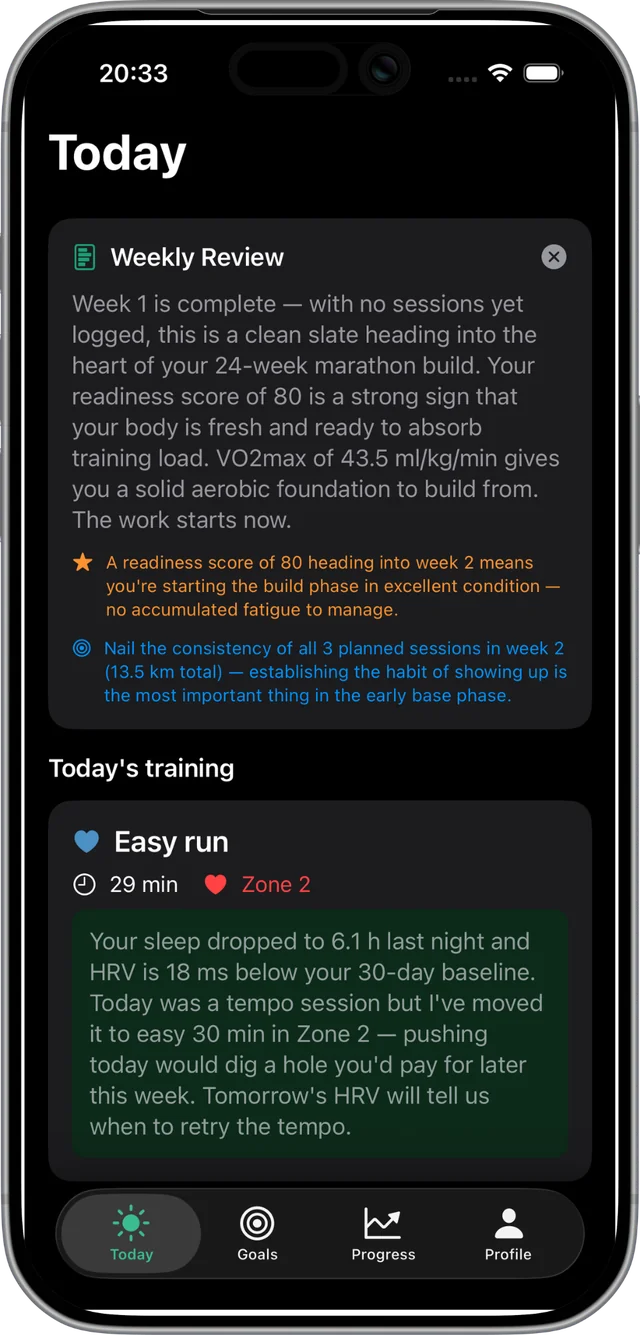
Post-run feedback is generated by the same AI engine, referencing specific numbers: the pace you actually ran, the target you were given, your average heart rate, and where you are in the training block. Feedback is honest but calibrated to context — running long and slow the day after a race is not a failure.

BetterRunning weekly review summary BetterRunning race-time projections on the Progress tab
  • Calibrated paces per zone, updated after every completed run with pace data
  • Weighted average favours accumulated data over single-session outliers
  • The AI explicitly references calibration in coaching notes ("your Z2 pace has moved to 5:42")
  • Post-run feedback delivered via local notification once the coach has finished reviewing your run — so the tap never lands on a spinner
  • Feedback tone adjusts to plan phase and effort type — hard sessions celebrated, easy sessions kept honest
Module 5

Apple Watch Integration

The plan lives on your wrist. Readiness score, today's session, interval structure, and real-time metrics — available before you've unlocked your phone.

On-wrist coaching

Start a workout. Not a sync routine.

After each readiness calculation, today's session and score are pushed to the Watch via WatchConnectivity. Watch face complications read from a shared App Group store, so your readiness and next run update whenever your iPhone writes fresh data — visible without opening any app.

During a workout, interval sessions include full phase tracking: the watch advances automatically through warm-up, interval reps, recovery periods, and cool-down — with haptic feedback on every phase change. No manual tapping required mid-run.

On completion, the workout is saved to HealthKit by the Watch app. The iPhone companion picks it up in the background — and again whenever you open the app — pulls all metrics, marks the session complete, and triggers the post-run feedback cycle automatically.

BetterRunning Apple Watch complication showing readiness score
  • Readiness score and session sync to Watch after every morning calculation
  • Watch face complications for readiness ring and next run summary
  • Interval phase tracking with automatic progression and haptic cues
  • Live pace, heart rate, and distance during workouts — no phone needed
  • Workout saved to HealthKit on the Watch; iPhone detects and processes it automatically
Module 6

Weather-Aware Coaching

The conditions you'll actually run in are part of the decision. Heat, cold, wind, humidity, and UV feed straight into the daily session and the post-run read.

Before the daily coach runs, BetterRunning fetches the current forecast for your location from Apple Weather. The model treats it as a practical input alongside your biometrics — nudging intensity, timing, and hydration advice when conditions warrant, and crediting you afterward when you held pace through a tough day.

Heat
≥ 28 °C

Suggests early-morning or evening timing, the lower end of the target zone, and a hydration reminder

Extreme heat
≥ 35 °C

Postpones hard sessions — easy or rest only

Cold
≤ 0 °C

Longer warm-up, layers, and traction awareness

High UV
≥ 8

A brief sunscreen / hat / sunglasses note

Wind
≥ 40 km/h

Flags wind as a real factor for effort and pacing

Humid heat
> 80% RH

Warns about compound heat-humidity stress above 80% RH

  • Woven into both the morning coaching and the review of your run afterwards
  • Coarse, ~1 km location used only to fetch the forecast — never sent to the coaching model
  • The weather snapshot is saved with your completed run so you can see what it was like
  • Deny location and coaching simply continues without a weather context — nothing breaks
Module 7

Race Prognosis

Projected finish times across every standard distance — fitted to your own running, not a population table.

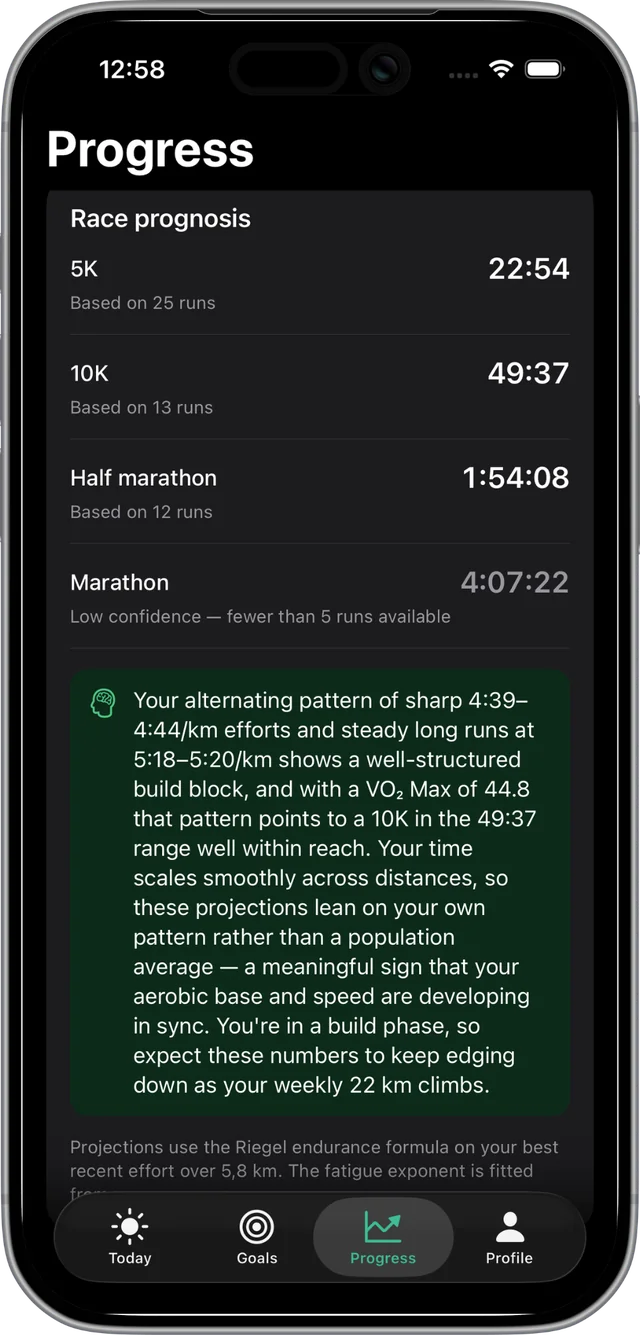
BetterRunning blends the Riegel endurance model with a Daniels VDOT model (folding in your VO₂ Max) to project 5K, 10K, half-marathon, and full-marathon finish times, leaning more on Daniels at longer distances so the marathon estimate stays honest. It draws on your runs from the last 90 days (≥3 km) and shows projections only once you have at least five qualifying runs. When you've logged runs across at least two distance buckets, it fits a personalised fatigue exponent from your own log-log pace pattern — falling back to the 1.06 population average only when there isn't enough variety yet. Each projection carries a confidence label, and the whole section is free for every user.

A premium AI narrative sits below the numbers: two or three sentences from a dedicated analyst prompt that leads with a concrete observation, highlights the most motivating projection for your current phase, and never dresses an estimate up as a guarantee.

Want to see the two models side by side on one of your own results? Try the race time calculator.

Riegel endurance model
T₂ = T₁ × (D₂ / D₁)k
k = personalised fatigue exponent, fitted from your log-log pace pattern · falls back to 1.06
Blend
Riegel + Daniels VDOT
VO₂ Max folded in · weight shifts toward Daniels as distance grows
90days of runs considered
≥3 kmper qualifying run
5qualifying runs before projections show
1.06population exponent fallback
  • Blended Riegel + Daniels VDOT projection, leaning more on Daniels at longer distances
  • Personalised exponent fitted from your own runs when data allows; 1.06 default otherwise
  • Confidence label per distance so you know how far to trust each row
  • Dashed least-squares trend overlays now sit on every Progress chart, too
  • Projections are calculated on-device — they keep working even when AI features are offline
Module 8

Adjust Your Plan

Life moves. Tell the coach in plain language and it rewrites the rest of the plan around it — without touching what you've already run.

The Adjust plan sheet takes a free-text request — "I'm travelling next week," "I pulled a muscle, give me two easy weeks" — and the AI proposes a complete revision of your remaining sessions. You see a plain-language summary of what will change on a confirmation screen before anything is applied, and the new plan is written transactionally so a hiccup can never leave you with a half-rewritten schedule. While the coach works, your goal's route lights up on the same deep-green screen as plan building, captioned with what it's being asked to change.

  • Completed sessions are sent read-only and are never altered — only future, uncompleted runs are revised
  • Your target date and the plan's periodization (build → peak → taper shape) are preserved
  • If a request is too vague, the coach asks for specifics rather than guessing
  • Every revision is logged on-device — your message, the coach's summary, and what changed
Module 9

Tempo Blocks in Long Runs

For experienced runners, a long run is more than time on feet. The coach can layer a structured faster segment inside it — and only when the training warrants it.

When BetterRunning classifies you as an advanced runner — a half or full-marathon goal, a peak above 50 km/week, or a running history spanning sixteen of the last twenty weeks — an opt-in toggle unlocks tempo blocks. With it on, the AI may build a progressive long run, mid-run pickups, or a fast-finish into selected long runs, rendered on both the iPhone Today card and the watch.

  • Three structures: progressive long run, pickups, and fast finish
  • Hard placement guardrails — never the day after a hard session, never in the first two weeks, never in a taper or recovery week
  • At least half of every long run stays in easy zone 2, no matter the block
  • Strictly opt-in and advanced-only — turn it off and your long runs stay classic
Module 10

Cycle-Aware Coaching

An optional layer that lets the daily coach tune its tone and intensity across your cycle — computed entirely on your device, and never named back to you.

Turn on cycle-aware coaching and BetterRunning works out your current cycle phase on-device — from Apple Health's menstrual-flow data if you grant it, or a date you enter yourself. Only the resulting phase and cycle day reach the coach, which uses them to subtly shift emphasis: a little more recovery and easy running in some phases, a confident green light to commit to intensity in others.

  • Off by default and fully opt-in, from Settings → Health
  • Your menstrual-flow date and cycle anchor never leave the device — only the inferred phase label and day are sent
  • The coach is instructed to adjust implicitly — it never names the phase in your coaching text
  • Layers on top of readiness, never overriding it — turn it off and no cycle context is sent at all
Privacy by design

The AI never sees your health records.

BetterRunning's data pipeline is built so that no raw biometric data ever leaves the device. The AI coaching engine receives aggregated outputs — not the underlying records.

On-device readiness scoring

The readiness calculation runs entirely on-device using HealthKit data. What the AI receives is summaries — a score, an HRV reading, sleep hours, training-load figures, your runs as totals — never the raw heart rate samples, sleep stage logs, or GPS tracks.

No identity in the AI context

The AI coaching prompts contain no name (unless the user has shared it explicitly in preferences), no Apple ID, no device identifier, and no location. The model knows your physiology — not who you are.

Zero third-party SDKs

No third-party analytics frameworks, no crash reporters, no advertising identifiers. External network calls go only to the AI coaching API, our own anonymous product-metrics endpoint, Apple Weather, Apple iCloud (CloudKit), and StoreKit — all of them either ours or Apple's. Everything else is on-device with native Apple frameworks.

Your device & your iCloud

We run no database of your training history. Every plan and coaching record lives on your device in SwiftData and — if you're signed into iCloud — mirrors to your private iCloud database, which only you can read. Delete the app or wipe the iCloud copy anytime.

Under the hood

Built on Apple's data infrastructure.

BetterRunning is native Swift — not a cross-platform wrapper. Every data access, sync mechanism, and UI component is purpose-built for iOS and watchOS.

AI engine

Powered by AI

The coaching engine uses a frontier AI model across nine coaching modes: goal assessment, plan generation, plan revision, session enrichment, daily adaptation, weekly review, run review (planned and free runs alike), a short note when you override a session the coach adjusted, and race prognosis. Each mode operates with a dedicated context and token budget appropriate to its task.

Health data

Native HealthKit integration

BetterRunning reads HRV (SDNN), sleep analysis with stage breakdown, resting heart rate, VO2 max, distance, running power and speed, running form metrics (ground contact, stride length, vertical oscillation), active energy, workout history, and — only with opt-in — menstrual flow for cycle-aware coaching. Sleep deduplication logic handles multiple wearables writing to the same Health store.

Watch platform

WatchKit + WidgetKit

The Watch companion uses HKWorkoutSession and HKLiveWorkoutBuilder for real-time workout tracking, WatchConnectivity for iPhone sync, and WidgetKit for always-on complication updates. The interval phase engine runs entirely on the Watch — no phone connection required mid-run.

Background intelligence

BGTaskScheduler refresh

A registered background task periodically refreshes your biometrics, runs the readiness engine, updates daily coaching, and pushes fresh data to the Watch and its complications — so your wrist is current before you wake up.

This page describes the coaching methodology and system architecture of BetterRunning at a conceptual level. Specific algorithmic parameters, prompt engineering, and proprietary calibration details are not disclosed.

Available now

Ready to train smarter?

Download BetterRunning for free and experience coaching that actually knows your body.

Free to download · Apple Watch strongly recommended · iOS 17+